Creating your Talismania account takes under two minutes. The registration process collects essential information for account security and regulatory compliance.
New players choose their preferred welcome bonus during signup. Options include the casino bonus, sports bonus, entering a promo code, or proceeding without a bonus.
After registration, verify your email to activate your account. Full withdrawal access requires completing identity verification through the Profile section.
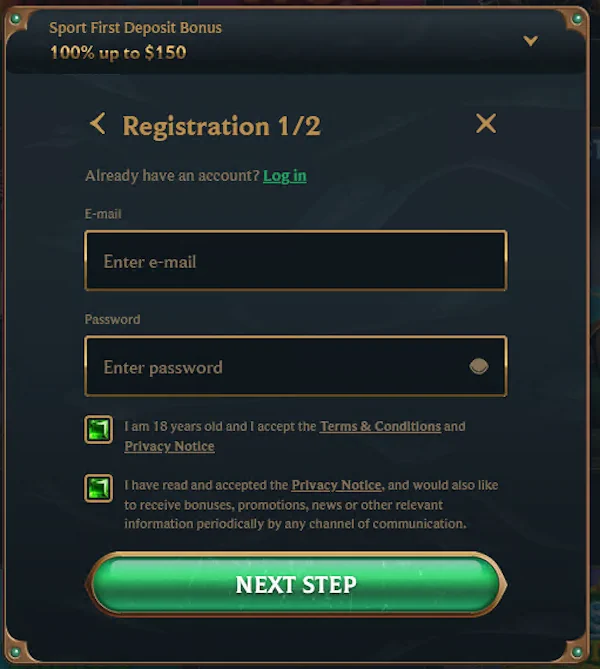
Follow these steps to register your Talismania account. Have your personal details ready before starting the process.
A confirmation email arrives within minutes. Click the verification link to activate your account and access all features.
The registration form requires accurate personal information. Details must match your identification documents for successful verification later.
| Field | Example | Required |
|---|---|---|
| Email Address | [email protected] | Yes |
| Password | Minimum 8 characters | Yes |
| Full Name | As shown on ID | Yes |
| Date of Birth | DD/MM/YYYY format | Yes |
| Residential Address | Australian address | Yes |
| Phone Number | Australian mobile | Optional |
Use your legal name exactly as it appears on your passport or driver's licence. Mismatched details cause verification delays when withdrawing funds.
During registration, you choose which welcome offer to activate. This selection determines what bonus credits to your account after your first deposit.
| Option | Description | When to Choose |
|---|---|---|
| Casino Bonus | 200% up to $750 AUD + spins | For pokies and table games |
| Sports Bonus | 100% up to $100 AUD | For sports betting |
| Promo Code | Enter specific code | If you have a code |
| No Bonus | Skip welcome offer | Play without bonus terms |
Review the full welcome bonus details to understand the offer before making your selection during signup.
Once registered with your bonus selected, make your first deposit to activate your welcome offer and start playing.
If you have a promotional code, enter it during registration to unlock specific offers. The code field appears after selecting the promo code option.
Promo codes cannot be added after registration is complete. If you forgot to enter a code, contact support to check if manual activation is possible.
After submitting the registration form, check your email inbox for the verification message. The email arrives within a few minutes from Talismania.
Check your spam or junk folder if the email does not appear in your inbox. Add the Talismania email address to your contacts to ensure future messages arrive correctly.
After email confirmation, complete the account verification process to enable withdrawals when you are ready to cash out winnings.
Set your country and currency during registration. These settings determine your available payment methods and how balances display in your account.
| Setting | Value | Note |
|---|---|---|
| Country | Australia | Select from dropdown |
| Currency | AUD | Australian Dollars |
| Language | English | Auto-detected |
Currency selection cannot be changed after account creation. Ensure you select AUD to avoid conversion fees and access Australian payment methods like PayID.
Access your existing Talismania account through the login button on the homepage. Keep your credentials secure and do not share them with others.
Your session remains active while you browse and play. The system logs you out automatically after extended inactivity for security purposes.
If you forget your password, use the recovery function to reset it. You need access to your registered email address to complete the process.
Reset links expire after a limited time. Request a new link if the original expires before you complete the password change.
Protect your Talismania account with strong security practices. Your account contains personal information and funds that require protection.
| Feature | Purpose | How to Enable |
|---|---|---|
| Strong Password | Prevents unauthorised access | Use 8+ characters with mixed types |
| Unique Email | Secure account recovery | Use email only you can access |
| Session Timeout | Auto logout protection | Enabled automatically |
Never share your login details with anyone. Talismania support will never ask for your password through email or chat.
Registration issues can occur due to technical problems or form errors. Most issues resolve by checking your entered information and trying again.
These issues frequently prevent successful account creation. Check each point before attempting registration again.
Try these solutions before reaching out for assistance with registration problems.
If registration still fails, contact 24/7 live chat support with details of the error message you receive.
Access issues prevent you from reaching your account and funds. Most login problems have simple solutions you can try immediately.
Several factors can block access to your account. Identify which applies to your situation.
Multiple failed login attempts trigger a temporary security lock. This protects your account from unauthorised access attempts.
Support can manually unlock your account after verifying your identity. Provide your registered email and any other details they request.
Click Register on the homepage, enter your email and password, provide personal details including name and date of birth, select your bonus preference, and confirm via email verification.
Registration requires your email address, a secure password, full legal name, date of birth, and residential address. Your phone number is optional.
The registration process takes under two minutes to complete. Email verification adds another minute depending on email delivery speed.
Email verification is required to activate your account. Full identity verification through document submission is required before making your first withdrawal.
Click the Login button at the top right of the website, enter your registered email address and password, then click Login to access your account.
Click Login then select Forgot Password. Enter your email address to receive a reset link. Click the link and create a new password to regain access.
No, each player is permitted only one account. Creating multiple accounts violates the terms and may result in account closure and forfeiture of funds.
Contact customer support via live chat or email to request an email address change. You may need to verify your identity before the change is processed.



© 2026 Talismania All rights reserved